Own the session
A custom Win32 shell, in C# and WPF, takes over the Windows session and presents one surface. The pinned applications are the whole machine.
Win32the shell is ours, not a policy

KioskBar turns a shared Windows PC into a single-purpose machine. In a public room the ordinary desktop is an open system: people reach whatever is installed, and the machine drifts into a state nobody supports.
Locking it down with policy left a shell that was slow, hard to restyle, and closed to anything useful. The work was to replace the desktop, not to configure it harder.
A custom Win32 shell, in C# and WPF, takes over the Windows session and presents one surface. The pinned applications are the whole machine.
Win32the shell is ours, not a policy
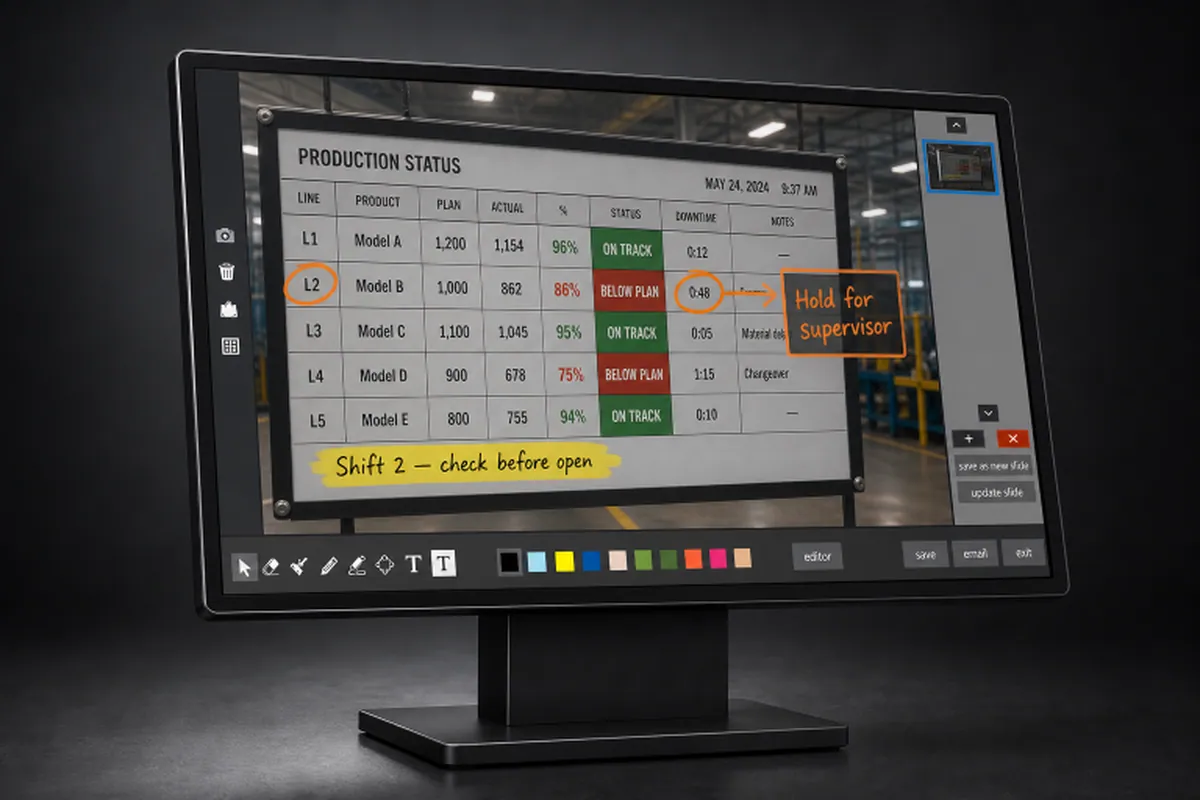
Whiteboard and screen capture sit in the session because the shell is ours. They are not apps a person has to go looking for.
In sessionwhiteboard and capture live there
These PCs arrive with odd monitors, including 4K and more than one of them. Scaling is handled in the shell, not inherited from a desktop nobody designed for the room.
4Kscaling for the screens that were bought
The build
Group policy and lockdown suites can hide a desktop. They cannot make it pleasant, and they cannot add a tool that feels native, because the shell still belongs to Windows. Every extra control is another layer a support call has to fight.
The session starts in our shell. There is one surface and a fixed set of applications, and leaving that set is not a setting someone forgot. Writing it against Win32, rather than scripting over Explorer, is what makes the boundary real.
A locked machine that cannot do the job gets unlocked. Whiteboard and capture are in the sidebar because the rooms these PCs sit in need them. Owning the shell is what makes those tools part of the session instead of another window on a desktop we were trying to hide.
More than one monitor, and 4K, is normal here. Getting the scaling right is part of the product looking intentional, which matters when the alternative is a desktop that announces itself as restricted.
How we worked
The team had to be comfortable in the Windows session itself. A policy template would have shipped faster and solved a different problem.
If the kiosk reads as a punishment, people route around it. The craft is the surface: what is pinned, how it scales, what is already in reach.
There is no external lockdown suite to keep in step with Windows. The shell is the control, which is simpler to live with and harder to write.
Technology
More work
Run displays anywhere, manage everything from one portal.
Tell us what you are trying to ship and an engineer will reply within one business day.